PIR Motion Sensor + Buzzer
Detect movement with an HC‑SR501 and sound a buzzer: using a non‑blocking millis() timer.
Project_4_ESP32_PIR_Motion_Sensor.ino, then open it in the Arduino IDE (setup: Foundation 3).
🎯 Objective
By the end of this project, you will:
- Understand how a PIR sensor detects movement, and what it cannot detect.
- Wire a 5 V sensor to the ESP32 safely and know why it uses
VINrather than3V3. - Use
millis()to build a non-blocking timer and explain whydelay()is the wrong tool for it. - Track state across loop iterations with a flag, so an event fires once instead of continuously.
- Build a small alarm that holds its output for a few seconds after the last movement.
1 · How the PIR sensor works
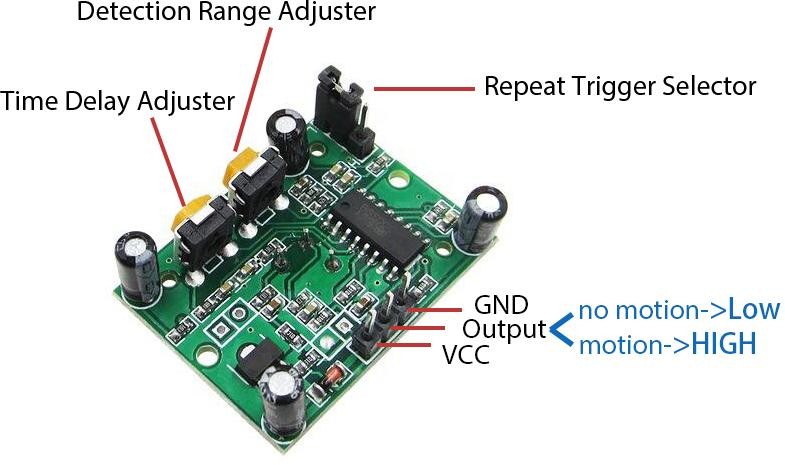
- A PIR senses the infra‑red heat of living bodies and triggers on change, a warm, moving object.
- OUT = HIGH on motion, LOW otherwise.
- A person standing perfectly still may not be detected; a moving heat‑less object (robot, car) isn't either.
2 · Non‑blocking timing: delay() vs millis()
delay(3000) freezes the whole program for 3 s. Instead we record when motion last happened and check elapsed time: keeping the loop responsive:
lastMotionTime = millis();                    // remember "now"
if (millis() - lastMotionTime >= holdTime) {  // has enough time passed?
  ...
}
This pattern scales to programs doing many things at once, a habit worth building early.
3 · Parts Required
| Qty | Part | Notes |
|---|---|---|
| 1 | ESP32 · breadboard · jumper wires | - |
| 1 | HC‑SR501 PIR | Powered from 5 V |
| 1 | Active buzzer | Beeps on its own when powered |
4 · Wiring the Circuit
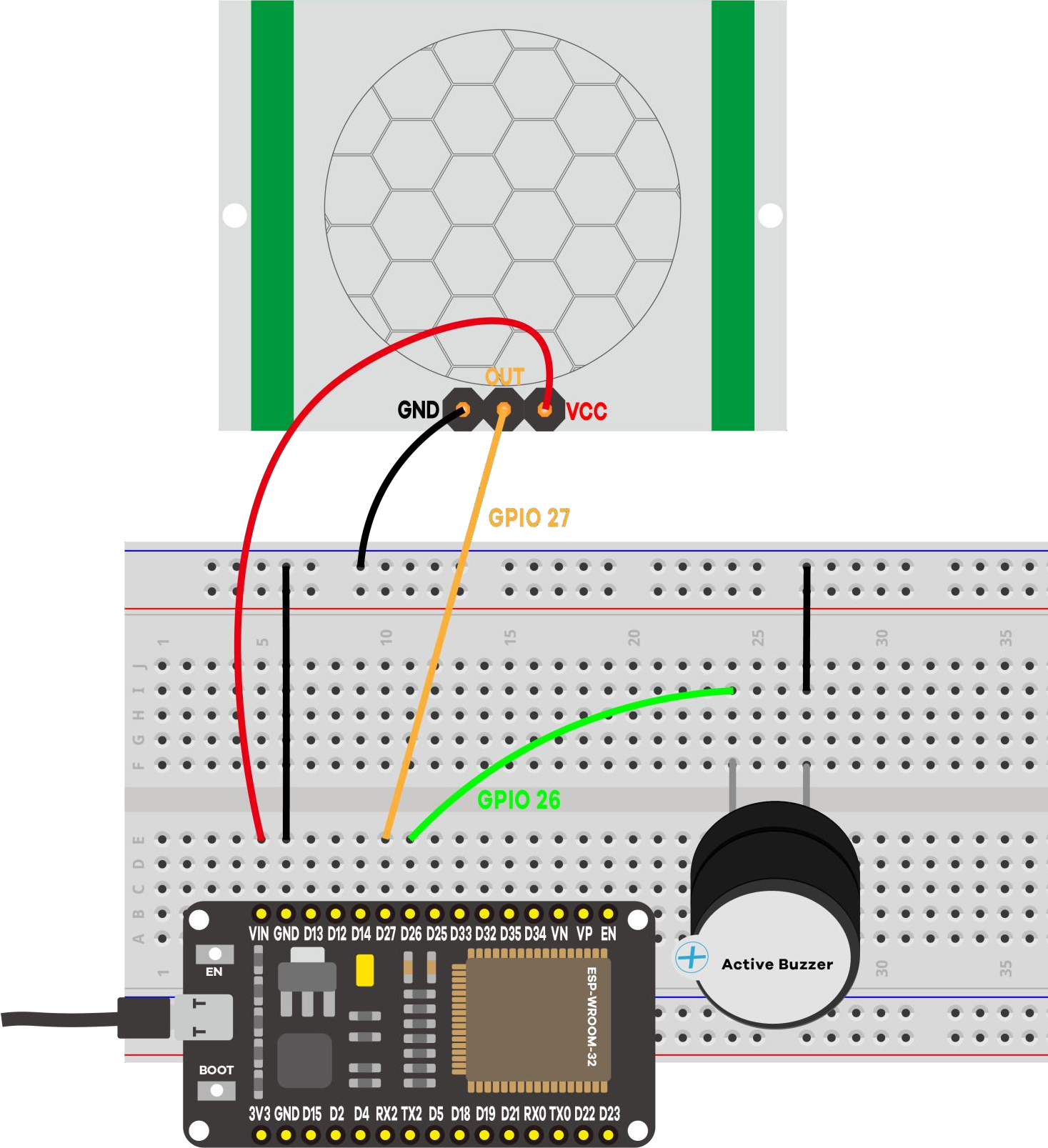
| From | To |
|---|---|
| PIR VCC | VIN (5 V) |
| PIR GND | GND |
| PIR OUT | GPIO 27 |
| Buzzer + | GPIO 26 |
| Buzzer − | GND |
VIN when USB‑powered). Its OUT signal is still ESP32‑safe.5 · Code Walkthrough: Understanding the Sketch
Let's walk through the sketch so you understand what each line does and why.
Step 1: Pins, the hold time, and the state we remember
const int buzzerPin    = 26;  // active buzzer -> GPIO 26
const int motionSensor = 27;  // PIR OUT       -> GPIO 27

const long holdTime = 3000;         // hold the buzzer this long (ms)
unsigned long lastMotionTime = 0;  // when motion was last seen
bool alarmActive = false;           // is the buzzer sounding right now?
Two variables carry the logic. lastMotionTime is a timestamp, not a countdown: it stores the moment motion was last seen. alarmActive is a flag recording what the program already did, which stops the buzzer being switched on again on every pass through loop().
unsigned long matters: millis() passes the range of a normal int in about 32 seconds, but an unsigned long holds roughly 49 days.Step 2: one-time preparation in setup()
pinMode(buzzerPin, OUTPUT);      // the buzzer is driven by the ESP32
pinMode(motionSensor, INPUT);    // the PIR drives this pin
digitalWrite(buzzerPin, LOW);    // start silent
Note the explicit digitalWrite(buzzerPin, LOW). A freshly configured output pin is not guaranteed to be in the state you want, and starting an alarm project with an unexpected beep is a poor demo.
Step 3: loop() watches for motion and times the hold
void loop() {
  bool motion = (digitalRead(motionSensor) == HIGH);

  if (motion) {
    lastMotionTime = millis();          // remember when we last saw motion
    if (!alarmActive) {                 // only act on the RISING edge
      digitalWrite(buzzerPin, HIGH);
      alarmActive = true;
      Serial.println("[EVENT] MOTION detected  -> buzzer ON");
    }
  } else {
    // No motion now: stop once the hold time has elapsed.
    if (alarmActive && (millis() - lastMotionTime >= holdTime)) {
      digitalWrite(buzzerPin, LOW);
      alarmActive = false;
      Serial.println("[EVENT] No motion (hold elapsed) -> buzzer OFF");
    }
  }
}
Read it as two questions asked thousands of times per second: is there motion right now? and, if not, has it been quiet long enough to stop? Because the loop never blocks, the sensor is still read while the hold counts down, so fresh motion pushes lastMotionTime forward and extends the alarm.
Key concepts: what each line really does
| Code | What it does |
|---|---|
digitalRead(motionSensor) == HIGH | The HC-SR501 drives OUT high while it sees movement, so reading it is exactly like reading a button. |
millis() | Milliseconds since boot. It keeps counting no matter what your code is doing, which is what makes it usable as a clock. |
lastMotionTime = millis() | Stores "now" as a timestamp. Every fresh detection overwrites it, restarting the hold period. |
millis() - lastMotionTime >= holdTime | The non-blocking timer: subtract the stored moment from the current one to get elapsed time, then compare. No waiting involved. |
if (!alarmActive) | Edge detection in flag form. Without it the buzzer would be re-commanded ON and the message re-printed on every pass. |
bool alarmActive | The program's memory of its own output state, so it can tell "start the alarm" from "the alarm is already running". |
Expected output on the Serial Monitor
==============================================
 Project 4: ESP32 PIR Motion Sensor + Buzzer
==============================================
PIR OUT -> GPIO 27
Buzzer  -> GPIO 26
Buzzer holds ON for 3000 ms after motion stops.
NOTE: the PIR needs ~30-60 s to warm up after power-on.
----------------------------------------------
[EVENT] MOTION detected  -> buzzer ON
[EVENT] No motion (hold elapsed) -> buzzer OFF
6 · Demonstration
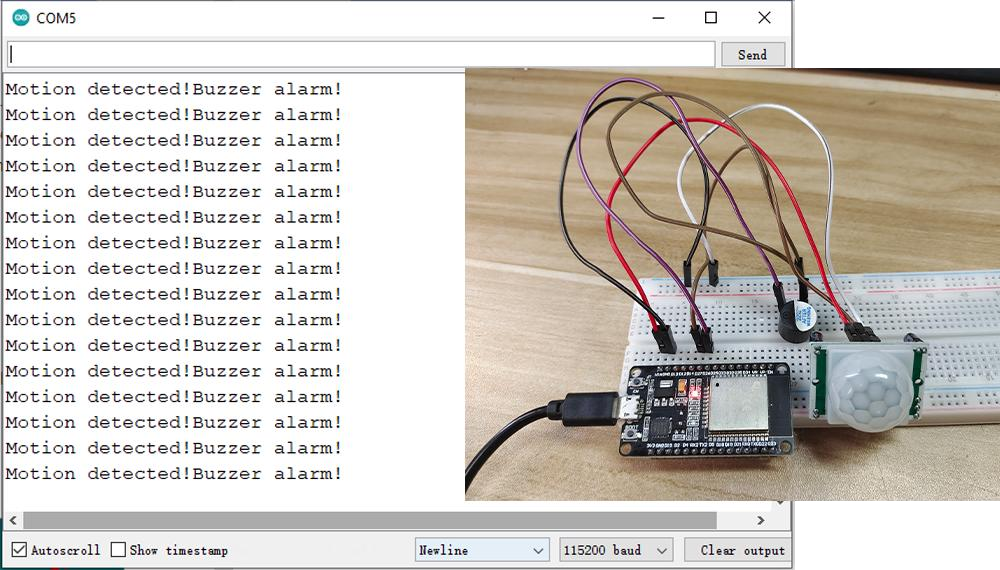
7 · Wrapping Up: What You've Learned
You now have a sensor driving an actuator, with timing that does not freeze the program. The key takeaways:
- A PIR sensor reports change in infra-red heat, so it sees a moving warm body but not a still one, and not a cold moving object. It also needs 30 to 60 s to warm up.
- Some modules need 5 V.
VINsupplies it while the board is USB-powered, and the HC-SR501's 3.3 V output is safe to feed back into a GPIO. millis()gives you a clock that never stops. Storing a timestamp and subtracting it later is the standard non-blocking timer pattern.delay()would have worked here but blocks everything. Once a project has two things to do at once (Projects 8 and 11 do), blocking code stops being an option.- A state flag like
alarmActivelets the program tell a new event from an ongoing condition, which keeps the log clean and the output stable.
8 · Troubleshooting
| Symptom | Likely cause | Fix |
|---|---|---|
| Always triggers | Warming up / sensitivity too high | Wait 60 s; lower the sensitivity trimmer |
| Never triggers | PIR on 3.3 V, or OUT mis‑wired | Power VCC from VIN (5 V); OUT → GPIO 27 |
| Buzzer silent | Reversed / wrong pin | + → GPIO 26, − → GND |
| Buzzer never stops | Constant motion / retrigger jumper | Hold still; check the jumper |
| Monitor blank | Wrong baud | Set it to 115200 |